Your Transparent PNG Looks Clean — Until You Put It on a Dark Background

Your sticker looks spotless on a white page — then it grows a dirty white ring the moment it lands on black. The background is already gone, so removing it again fixes nothing: what you are seeing is the faint residue the remover left along the edge. Run the PNG through the cleaner and it strips only that residue — anything under opacity 16, plus loose specks up to 30 pixels — and leaves the soft edge alone.
Try the toolClean Leftover Pixels in Transparent PNGsFind and remove faint pixels and small detached specks left behind in a transparent PNG. Your files stay in your browser and are never uploaded.loopyti.comOne caution before you start: if you already put the haloed PNG on a dark product photo and someone saw it, cleaning the file now does not unsee it. The halo is pixels inside the saved file, not a display glitch — clean the file and swap it in.
" is checked.
- Click "Find and clean", check the three views, then download. The red overlay marks what will be removed, the dark-background view shows what a buyer would actually see, and the checkerboard shows the real transparency. Download the cleaned PNGs — one file at a time, or all of them together as a ZIP.
Does it actually work? I tested six PNGs
Tested 2026-11-14, defaults unchanged, and re-tested the same day after the tool was fixed (the first version of this post described the old behaviour — see below). The halo rings measured alpha 9–11, about 12 pixels wide — just under the threshold of 16, so they were exactly the kind of residue the tool is built for. The dots measured alpha 8–13, radius 2–3 pixels, sitting 202–465 pixels from the subject. The shadow was an alpha-90 ellipse touching the circle logo.
Here is what came back, file by file:
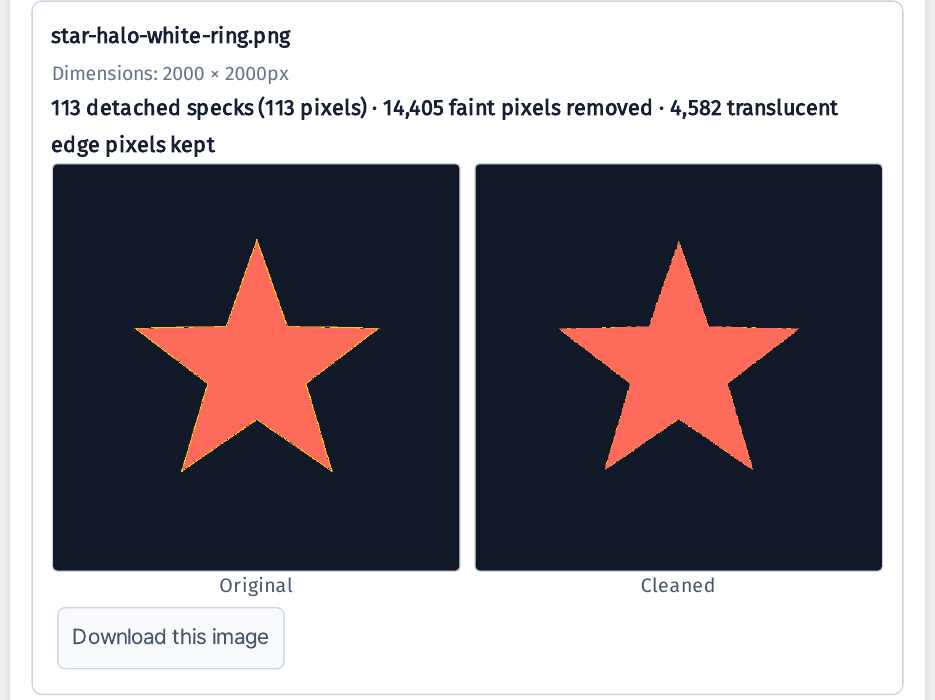
- Star, white halo ring: the ring is gone to the eye on a dark background. 18,987 faint pixels removed, 0 translucent edge pixels kept.
- Heart, white halo ring: the same — the ring is gone. 28,068 faint pixels removed, 0 edge pixels kept.
- Teal circle logo, white halo ring: the same — the ring is gone. 55,914 faint pixels removed, 0 edge pixels kept.
- Star, three faint dots: all three dots are gone — I checked the pixel values at all six dot centres, and the alpha went from 8–13 down to 0. 5,712 faint pixels removed, 0 edge pixels kept.
- Heart, three faint dots: all three gone. 4,554 faint pixels removed, 0 edge pixels kept.
- Circle logo, attached shadow: the shadow is untouched in all three views. 4,899 faint pixels removed, 0 edge pixels kept — and the shadow itself is pixel-for-pixel identical: the count of alpha-90 pixels is 273,995 before and after.
 At normal size the ring itself is invisible — and on the checkerboard all six files came out clean, with no rough or jagged edge anywhere.

- The speck counter does not count faint dots. Two files with six dots removed between them both report "0 detached specks." Do not read that number as how many specks were removed.
- Cleaned files now come out smaller than the originals. My star PNG went from 83,943 bytes to 55,104 — about two-thirds — and the six-file ZIP is 410,938 bytes against about 525 KB of originals. (An earlier version of this post said they ballooned to ten times — that was true before the fix, and it is fixed now.)
- JPGs can't be cleaned. "Only transparent PNG and WebP images are supported. JPG files cannot contain transparent pixels." There is no transparency to clean in a JPG.
- There is no zoom in the preview. Clicking the preview image does nothing, so I checked the edges by enlarging crops of the actual downloaded files instead.
- Very faint pixels may shift colour slightly when saved — the page warns that "the difference is usually hard to see." I did not measure a colour shift.
- Your files stay in your browser and are never uploaded. Every shape in this post's samples is made up, so there is no personal data or trademark in them either.
The one line to remember
Don't remove the background again — clean the edge it left behind.
Try the toolClean Leftover Pixels in Transparent PNGsFind and remove faint pixels and small detached specks left behind in a transparent PNG. Your files stay in your browser and are never uploaded.loopyti.comFAQ
Do I need to remove the background again? No. This tool is for PNGs whose background is already removed — it only cleans the leftover pixels. If your image still has a background, remove that first, then clean the residue.
Will it remove the shadow under my product? No. Translucent areas that touch the subject, like shadows or glass effects, are kept on purpose. My alpha-90 shadow came out pixel-for-pixel identical, 273,995 pixels before and after.