Stacked Screenshots Repeat the Same Lines Twice? Stitch Them by Removing the Overlap

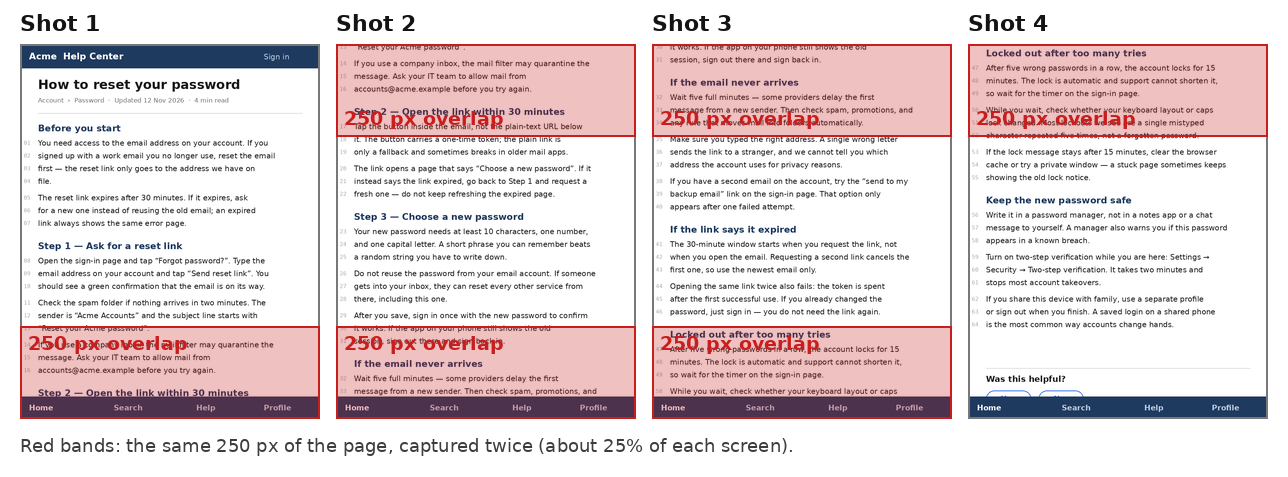
Don't stack the shots in an editor and call it done — every overlap comes back as the same paragraph twice, and trimming three seams by eye never lands exactly. Add the four screenshots top to bottom in the stitcher instead: it finds each overlap and cuts it, and the fixed bottom bar is kept once, so the four shots come back as one clean long image.
Try the toolStitch ScreenshotsUpload screenshots with overlapping sections, and this tool removes the duplicates and joins them into one long image. Use it to share a full chat, web page, or map that does not fit on one screen.loopyti.comOne caution before you start: if you already stacked the shots raw and shared the image, the duplicates are baked in. The only fix is to restitch from the original four screenshots, so don't delete them.
How to stitch them in three steps
- Shoot with overlap. Scroll slowly and leave about a quarter of the screen visible each time, so every shot shares a strip with the next one. My four shots of a help page were 800×1,000 px each, overlapping by 250 px — about 25% of the screen. The tool takes up to 30 shots at once, 30 MB each.
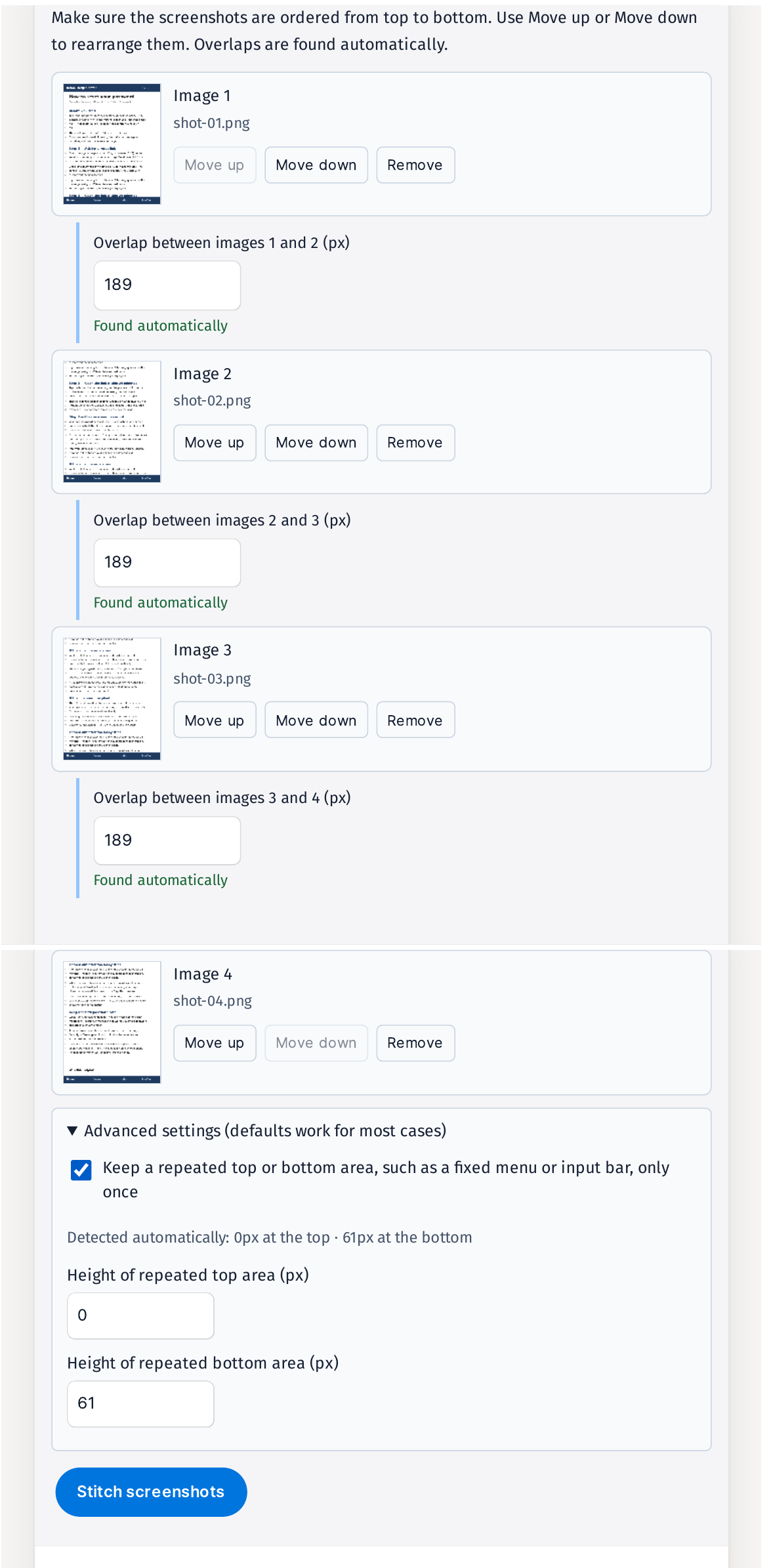
- Add them top to bottom and check step ②. Use Move up or Move down to fix the order, then look at the overlap fields. The tool found 189 px at all three seams by itself — "Found automatically", nothing to type. Leave the Advanced setting on: it detected the fixed bottom bar as 61 px and keeps it in the final image only once.
- Review the preview, then save. Blue lines mark where the screenshots join, so scroll through and check for clipped or repeated lines. Step ③ reported "Removed 3 overlaps", the toast said "Screenshots stitched. Review the preview.", and the result was 800×3,250 px. Save it as PNG or JPG.
Does it actually work? I tested it
I made a fake help page — "Acme Help Center — How to reset your password", 64 numbered lines, 800×3,250 px — and captured it in four 800×1,000 screenshots with 250 px overlap and the same 60 px fixed bottom bar ("Home · Search · Help · Profile") in every shot. Tested 2026-11-12.
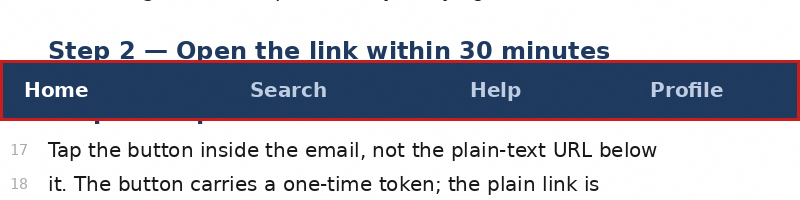
Stacked raw, the four shots make an 800×4,000 px image with 750 px repeated: the "Step 2 — Open the link within 30 minutes" heading and the lines around it show up twice, and the bottom bar appears four times.
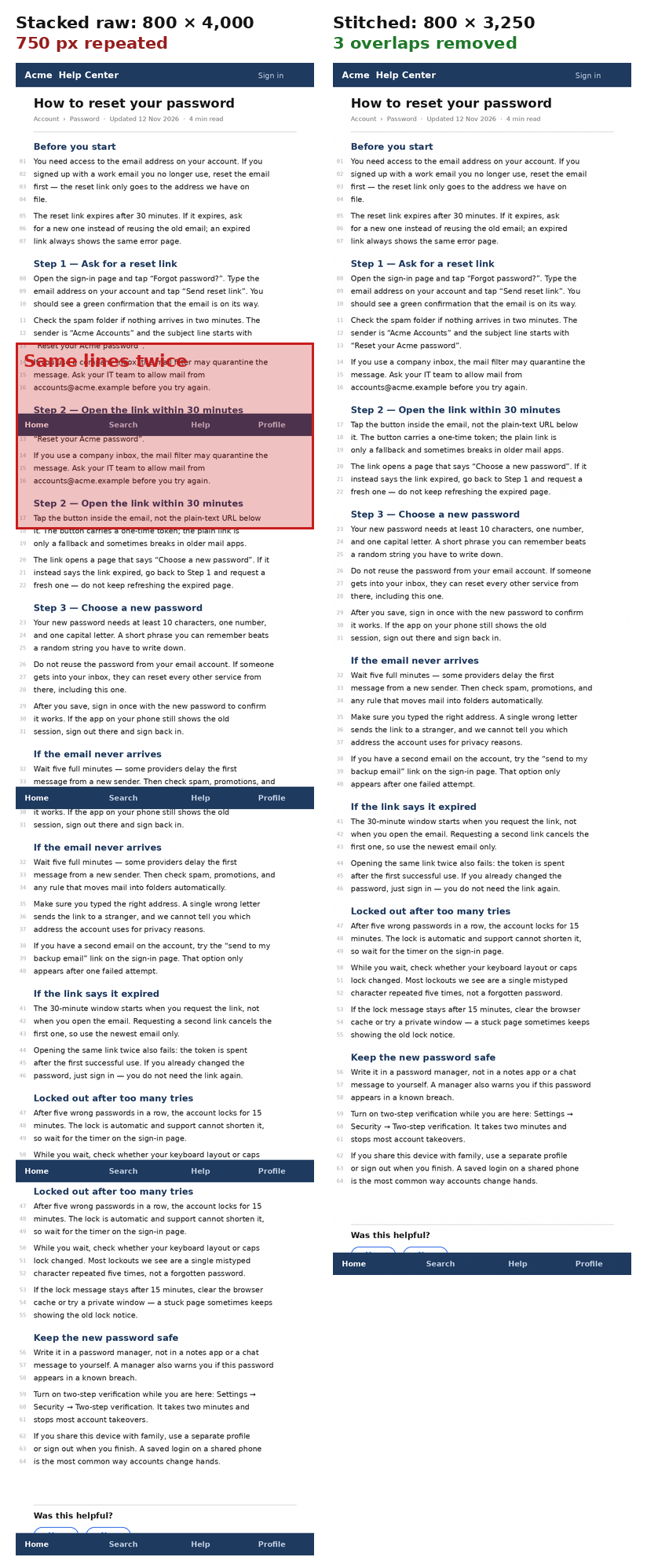
Run through the stitcher with bar removal on, the result is 800×3,250 px — exactly the height of the original page — and the file came out as a 4,021,826-byte PNG. I checked the pixels directly: the navy bar appears only at the very bottom of the stitched image, and the middle seams show page content, not the bar. Zoomed in on the first seam, line 16 is followed by line 17 with no line repeated.
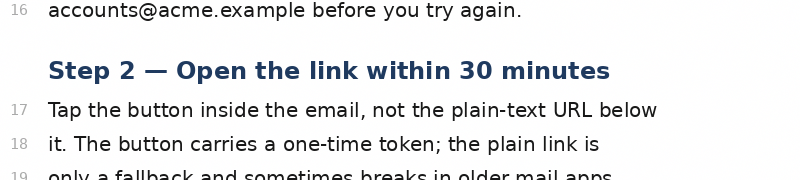
Why 189 px and not 250? The 250 px overlap includes the 60 px fixed bar, so the real content overlap is 190 px — and the tool measured the bar as 61 px, so 250 − 61 = 189. Changing the bottom height from 61 to 60 px re-detects the overlap as 190 px, and the final image stays 800×3,250 px either way.
I also ran it with bar removal off. The moment the checkbox goes off, the overlaps reset to 0 px, each seam warns "No overlap found, so the images were joined as-is. Enter a value to adjust it.", and the summary reads "800 × 4,000 px" with "Removed 0 overlaps · 3 need review". Typing 190 px into each seam by hand gives an 800×3,430 px image (4,224,368 bytes) — but the bottom bar repeats four times inside it, at about y 970, 1,780, 2,590 and 3,400. Leave the checkbox off and type nothing, and you get 800×4,000 px with all 750 px duplicated.
Two small quirks, in passing: typing all three overlap values at once only applied the first, and the summary size only refreshes after you press Enter.
Why the same lines repeat
The overlap is the same screen area captured twice — the tool keeps one copy and drops the other. That is the whole trick: the seam is where two shots show the same lines, and trimming it leaves each line exactly once. A gap is the opposite problem: an area no shot captured, so there is nothing to fill it with.
What about the other ways?
Crop and join by hand in an editor works, but you align three seams by eye and cut each one yourself — one pixel off and a line doubles or gets clipped.
Your phone's built-in scrolling capture does it in one tap when it works. On long pages and in some apps and web views it fails or cuts the middle, and there is no seam to adjust when it does.
Panorama apps are made for photos. On a text page they warp and bend the letters.
The stitcher's place is the middle case: shots you already took, with seams you can check before saving.
What it won't do — read this first
- Turning bar removal off also turns off auto-detection. The overlaps reset to 0 px, so you have to type each one in yourself — and if you skip that, the shots are just joined as-is.
- Gaps between shots stay gaps. If a strip of the page never got captured, stitching can't invent it. Reshoot with more overlap.
- Repeated patterns can confuse detection. Empty areas or identical chat bubbles look the same everywhere, so check each seam against the blue line before saving.
- No HEIC. Convert to JPG, PNG or WebP first.
- Fixed sidebars and horizontal scrolling aren't supported, and it's not a tool for horizontal panoramas.
- Very tall results are split. Over about 16,000 px tall, the result comes back as several images in a ZIP instead of one.
- Skim before you share. Screenshots often carry notifications or account details in the margins.
The one line to remember
Shoot with overlap, stitch with the overlap trimmed — one page, one copy of every line.
Try the toolStitch ScreenshotsUpload screenshots with overlapping sections, and this tool removes the duplicates and joins them into one long image. Use it to share a full chat, web page, or map that does not fit on one screen.loopyti.comFAQ
What if the tool can't find the overlap? Type the overlap height in pixels into the field in step ②. If your shots have a fixed bar, measure the content overlap, not the whole scroll overlap — in my test the shots overlapped by 250 px but the content overlap was 190 px, because the 60 px bar sat inside it.
Can I stitch screenshots of different widths? Yes. They are scaled to the narrowest width before stitching.