Excel Turned My Product Code 1E5 Into 100000 — It Was Never a Number

Don't double-click the supplier CSV. The moment a spreadsheet opens it, codes like 1E5 stop being codes — they are read as numbers, and if you save, the change is permanent. Check the file first instead: run it through the checker, download the value-preserving XLSX, and 1E5 stays the text 1E5.
Try the toolPrevent Excel Data Loss: CSV Value CheckCheck CSV and Excel data for values spreadsheet apps might change, then export an XLSX that preserves them.loopyti.comOne warning before you start: if you already opened the file, watched the codes turn into numbers, and saved it, the original codes are gone. The tool can't bring back information that no longer exists — it can only protect a file that still has its original values. If you still have the original CSV, check that one.
 and checks every cell against the patterns spreadsheet apps misread.
- Read the results. The checker reports how many cells face each risk and where they are. My file came back "Check complete" with 8 at-risk cells, all of them "May be interpreted as scientific notation" — rows 2 to 9, column 1, the eight codes in order: 1E5, 2E7, 3E4, 9E1, 5E2, 7E3, 4E6, 6E8. The summary also counts "Overlapping code groups 2" — the collisions, listed in their own section below the preview. Each one carries the recovery status "Can be corrected" and a recommended output identical to the original.
- Export the value-preserving XLSX and open it. Click "Download value-preserving XLSX · Recommended" — a toast appears: "Value-preserving XLSX saved." The at-risk values are stored as text, so a spreadsheet leaves them alone.
.
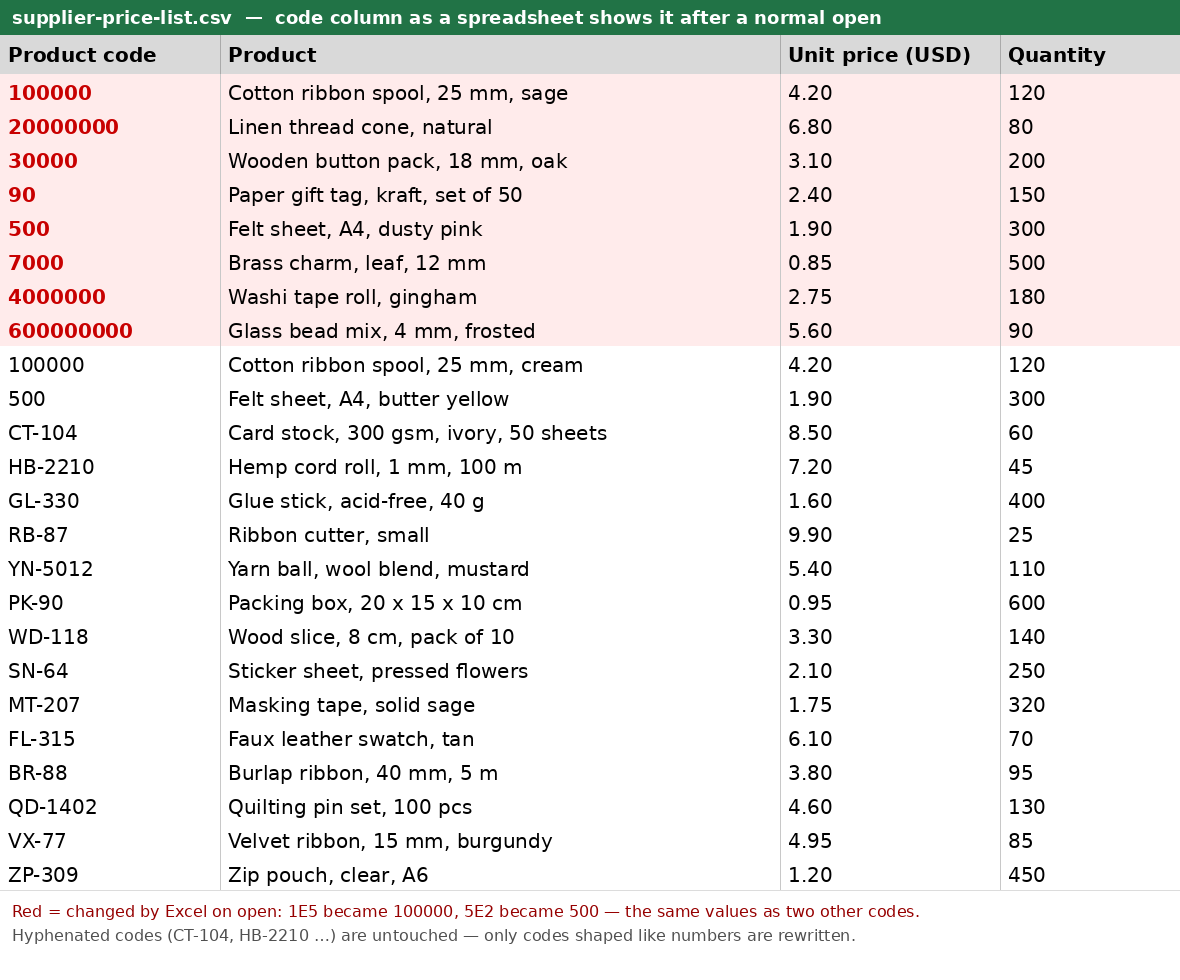
Open that CSV the normal way and a spreadsheet rewrites 8 of the 24 codes. I checked the same file in LibreOffice first, which produced exactly these values:
| Code as written | What the spreadsheet shows |
|---|---|
| 1E5 | 100000 |
| 2E7 | 20000000 |
| 3E4 | 30000 |
| 9E1 | 90 |
| 5E2 | 500 |
| 7E3 | 7000 |
| 4E6 | 4000000 |
| 6E8 | 600000000 |
The worst part isn't the new numbers — it's the collisions. My list already has a code 100000 (a cream ribbon spool, same product family as the sage spool coded 1E5) and a code 500 (a butter-yellow felt sheet, next to the dusty-pink sheet coded 5E2). After a spreadsheet opens the file, 1E5 and 100000 are both 100000, and 5E2 and 500 are both 500. Two different products now share one code, and nothing in the sheet says which row is which. Twenty-four distinct codes go in; twenty-two distinct values come out.
, reopened with all 24 rows intact, and I checked every cell: all eight codes came back as text — 1E5, 2E7, 3E4, 9E1, 5E2, 7E3, 4E6, 6E8, exactly as written. The plain codes 100000 and 500 came back as text too, and so did every price and quantity — the export stores the whole sheet as text, not just the flagged cells.

- No XLS files, and size limits apply. CSV and XLSX only; files over 10 MB or 50,000 rows are rejected, and only the first sheet is inspected and exported.
- Take the XLSX, not the CSV, if you want the codes kept. The checker also offers a UTF-8 BOM CSV download, but that is for preventing garbled text — it does not guarantee leading zeros, dates, or long numbers stay preserved. Only the XLSX stores the values as strings.
- A clean result means "no risk signals found", not "the data is correct." The tool doesn't check for typos or wrong values.
- Your file stays on your machine. Inspection and export run in your browser; nothing is sent to a server, so a customer list stays a customer list.
- This post is only about the short-code case. Long numbers losing their last digit, postal codes losing a leading zero, and dates like 3-4 turning into March 4 are different symptoms of the same tool — they are covered in Why Excel Breaks Your CSV: Long Numbers, Leading Zeros and Dates.
The one line to remember
Check before you click — 1E5 is a code, not a hundred thousand.
Try the toolPrevent Excel Data Loss: CSV Value CheckCheck CSV and Excel data for values spreadsheet apps might change, then export an XLSX that preserves them.loopyti.comFAQ
Can the tool fix codes a spreadsheet already converted? No. Once the original value was saved as a number, there is no information left to restore it accurately. Review the suspected damage in the results, and if you still have the original CSV, check that file instead.
Does a clean result mean the file is safe? It means the inspection rules found no risk signals. It doesn't check for typos or incorrect data, so a code that was wrong in the source stays wrong.