
Prevent Excel Data Loss: CSV Value Check
Check CSV and Excel data for values spreadsheet apps might change, then export an XLSX that preserves them.
Quick start
- Upload a file to run the check.
- Review the results and save them as XLSX.
What this tool produces
This sample shows the order list in Google Sheets with Korean column headers. Importing the original CSV with default settings changes some values; the XLSX from this tool preserves them.
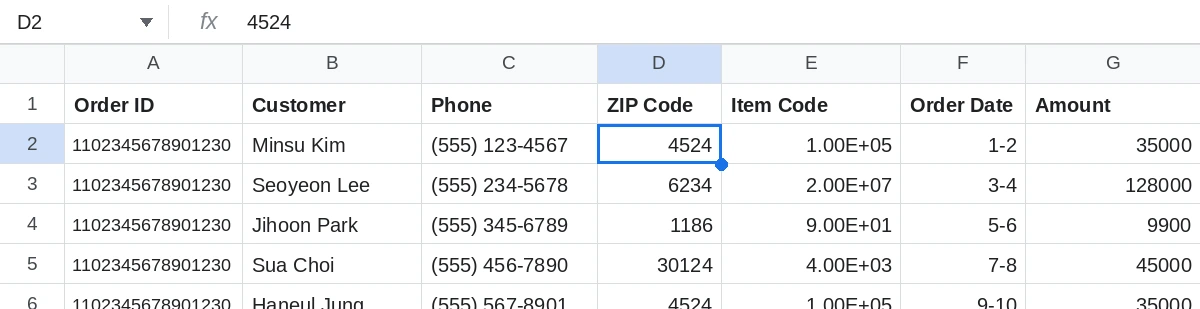
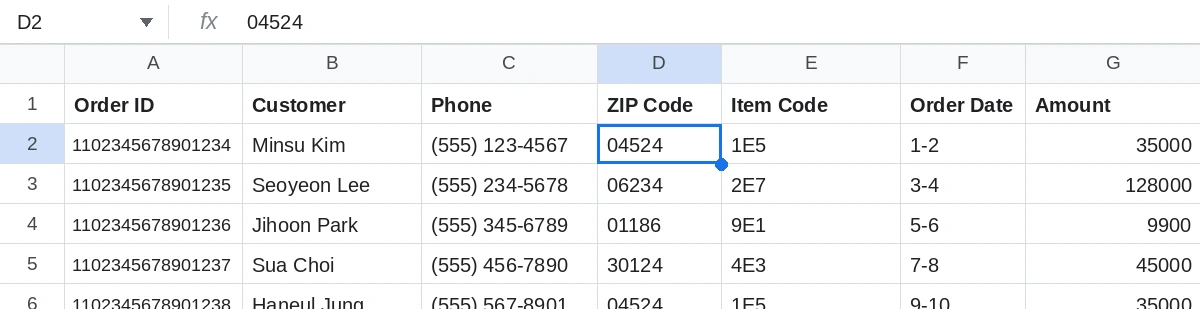
Example: before and after
A made-up order list with 5 orders.
Before · CSV as written
| Order number | Customer | Phone | Postal code | Product code | Order date | Amount |
|---|---|---|---|---|---|---|
| 1102345678901234 | Minsu Kim | (555) 123-4567 | 04524 | 1E5 | 1-2 | 35000 |
| 1102345678901235 | Seoyeon Lee | (555) 234-5678 | 06234 | 2E7 | 3-4 | 128000 |
| 1102345678901236 | Jihoon Park | (555) 345-6789 | 01186 | 9E1 | 5-6 | 9900 |
| 1102345678901237 | Sua Choi | (555) 456-7890 | 30124 | 4E3 | 7-8 | 45000 |
| 1102345678901238 | Haneul Jung | (555) 567-8901 | 04524 | 1E5 | 9-10 | 35000 |
After · 19 of 35 cells at risk
| Problem | Cells | Example cell | Original value → what Excel does |
|---|---|---|---|
| Precision loss in 16-digit numbers | 5 | A2 order number | 1102345678901234 → the last digit becomes 0. All five distinct order numbers then look like the same value. |
| Leading zero lost | 4 | D2 postal code | 04524 → 4524 |
| Read as scientific notation | 5 | E2 product code | 1E5 → converted to 100000 |
| Automatic date conversion | 5 | F3 order date | 3-4 → converted to March 4 |
Every fix uses “Keep as text.” This leaves the value unchanged and prevents Excel from reading it as a number.
All of this is made-up example data. The table exists only on this page and is not a download.
What this tool does
Opening a shipping CSV can leave Korean text garbled, turn postal code 01234 into 1234, or display a long member ID as 1.23E+15. Saving at that point can make the original values difficult to recover.
Results show how many cells face each risk and where they are. Risks include encoding issues, leading zeros, long numbers, and possible date, exponent, or fraction conversions. The tool stores at-risk CSV values as strings in a value-preserving XLSX. It flags suspected damaged cells in XLSX files without changing their types. It never overwrites the original file.
The tool detects CSV encoding (UTF-8, UTF-8 BOM, or CP949) and checks value patterns such as leading zeros, numbers longer than 15 digits, and date-like codes. For XLSX files, it also checks cell types and formatting. Inspection and export run in your browser; files are never sent to the server.
How to use
- Add a file
- Review the check results
- Export as XLSX
What it does not do
- The tool cannot restore values that were damaged or lost when the file was saved.
- Original information lost after saving values as numbers or dates cannot be restored accurately. Findings are labeled Fixable, Recovery uncertain or Unrecoverable. CSV and XLSX are supported; XLS is not. Files over 10MB or 50,000 rows are rejected. Only the first sheet is inspected and exported.
Frequently asked questions
Are files uploaded? I am concerned about customer information.
Inspection and export run in your browser. Files are not sent to the server or kept as account data.
Can it fix postal codes that have already lost zeros?
Once the original value has been lost, there is no information to restore it accurately. Review the suspected damage and inspect the original CSV if available.
Can I open the downloaded file in Excel?
You can download a value-preserving XLSX or a UTF-8 BOM CSV. Values are stored as strings only in the XLSX. Suspected damaged cells from XLSX input retain their types. The CSV helps prevent garbled Korean text, but it does not guarantee that leading zeros, dates, or long numbers will be preserved.
Why does Korean text become garbled?
This can happen when the encoding used to save a file differs from the encoding used to read it. See the guides below for UTF-8, CP949, and import instructions.
Does a clean result mean everything is safe?
It means the inspection rules found no risk signals. The tool does not check for typos or incorrect data.
Files and personal information
Files are processed only in your browser and are never sent to a server.