
Fix EPUB Chapters & TOC: split chapters, rebuild contents, edit metadata
Fix just the parts of an EPUB you need right now, without learning a new ebook editor.
Quick start
- Open the EPUB and look at its structure.
- Split or merge chapters.
- Check links and download the fixed file.
What this tool produces
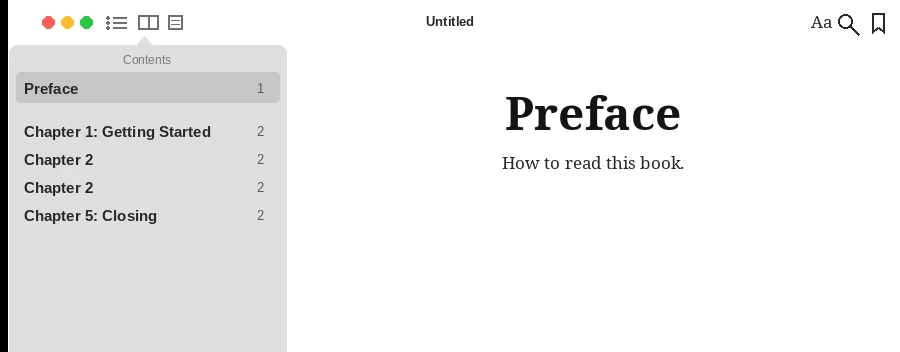
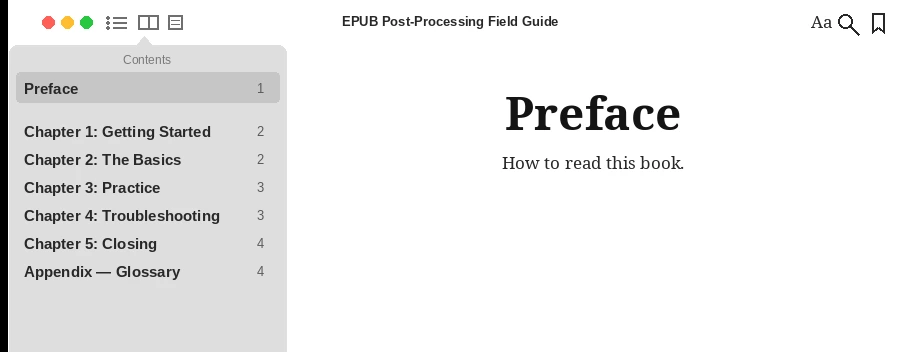
The tool’s sample EPUB before fixing, and the file downloaded after the tool rebuilt its table of contents and corrected the book information, each opened in Apple Books on a Mac (captured with the Korean sample book).
Example: before and after
The result of fixing a small example EPUB with a broken table of contents.
Before · broken contents and book information
Contents
- Preface
- Chapter 1 Getting started
- Chapter 2 (no title)
- Chapter 2 (no title, duplicate)
- Chapter 5 Wrapping up (broken link — missing file)
1 broken link · 4 chapters missing from the contents
Book information
| Field | Value |
|---|---|
| Title | Untitled |
| Author | (empty) |
| Language | ko |
| Publisher | (empty) |
After · fixed contents and book information
Contents
- Preface
- Chapter 1 Getting started
- Chapter 2 The basics
- Chapter 3 In practice
- Chapter 4 Troubleshooting
- Chapter 5 Wrapping up
- Appendix — Glossary
0 link errors
Book information
| Field | Value |
|---|---|
| Title | A Practical Guide to Fixing EPUB Files |
| Author | Loopyti Editorial |
| Language | en |
| Publisher | Loopyti |
All of this is made-up example data. The table exists only on this page and is not a download.
What this tool does
This post-processing tool fixes a finished EPUB whose chapters are split wrongly, whose table of contents needs rebuilding, or whose cover and book information need changing. Open the EPUB in your browser to see its internal structure, split or merge chapter files, tidy the contents and metadata, and download it again as an EPUB. It addresses structural problems found just before completion or distribution; it does not replace an ebook editor such as Calibre or Sigil.
How to use
- Open the EPUB to see its internal files and chapters.
- Split or merge chapter files as needed.
- Edit the existing table of contents, or rebuild it from the current chapters.
- Change the title, author, language, publisher and cover image.
- Check internal links and missing files, then download the fixed EPUB.
What it does not do
- It does not remove DRM or decrypt files. Books with DRM are not opened.
- It is not a WYSIWYG editor for body text. Chapter structure, contents, metadata and cover are its main scope.
- The check covers internal links and missing files. Keep a separate copy of the original EPUB before editing.
Frequently asked questions
Does it work on books with DRM?
No. It does not remove DRM or decrypt files.
Can I rewrite the body text?
It is not a WYSIWYG editor for body text. Chapter structure, contents, metadata and cover are its main scope.
Is my file uploaded to a server?
No. Opening and repacking the EPUB happens in the browser you are using.
What if the fixed EPUB does not open in my reader?
You can check internal links and missing files before downloading. We recommend keeping a separate copy of the original EPUB before editing.
Files and personal information
Files and anything you enter are not sent to a server. They are processed only in the browser you are using now, and closing the window clears what you entered.
Your original file is not changed. Still, keep a separate copy of the original EPUB before editing.