
Make Name Tags & Cubby Labels: tidy the roster into a CSV
Paste your class list, tidy it, and download a CSV ready for name tags, cubby labels and artwork labels.
Quick start
- Paste the class list or open a file.
- Check how names, numbers and classes were split.
- Download the CSV for bulk-create tools.
What this tool produces
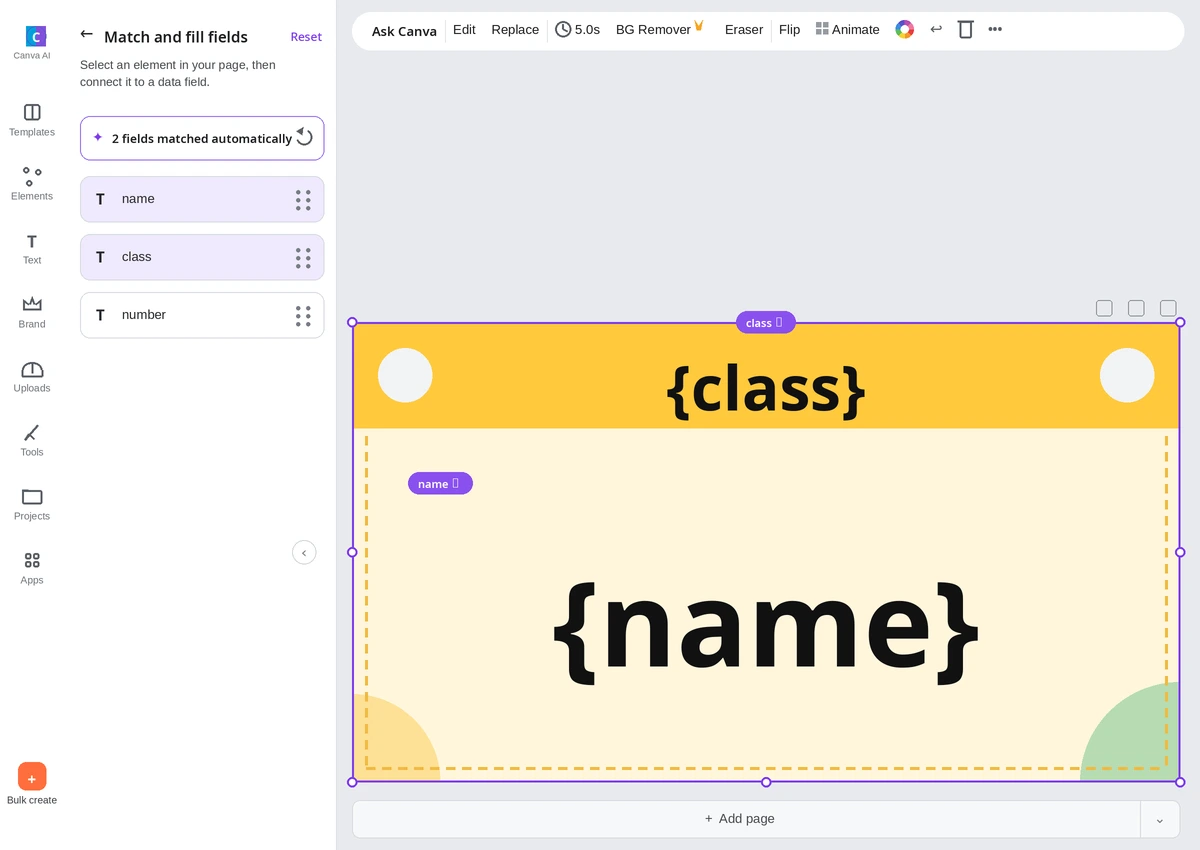
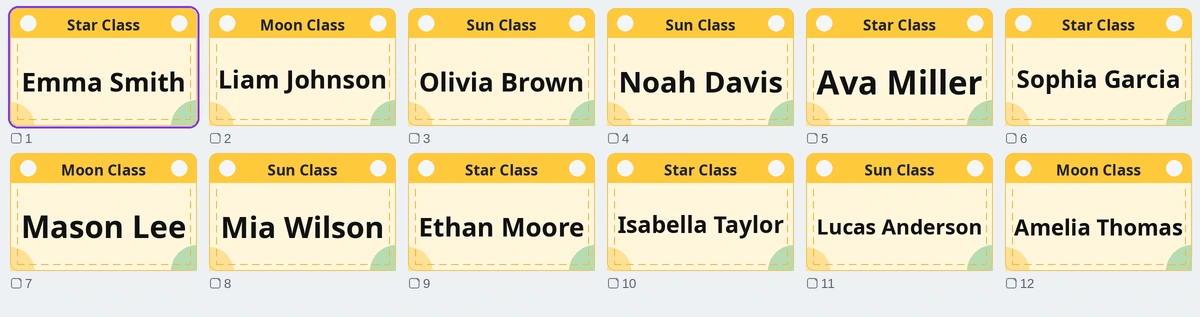
The CSV downloaded from this tool’s example roster (name, class and number columns) was loaded as-is into Canva Bulk Create, which filled one name-tag design for all 12 children at once.
Example: before and after
A list of 12 children in three classes, with commas, tabs and number styles mixed as if copied from a messenger and a spreadsheet.
Before · the pasted list
Emma Smith, 1, Moon Class
Liam Johnson	2	Moon Class
3. Olivia Brown	Moon Class
Moon Class, 4, Noah Davis
1, Emma Smith, Sun Class
Ava Miller , 2 , Sun Class
Sophia Garcia	Sun Class	3
4. Mason Lee, Sun Class

Mia Wilson, 1, Star Class
Ethan Moore	2	Star Class
3. Isabella Taylor, Star Class
Star Class	4	Lucas Anderson
After · 12 children (name, number, class; sorted by name)
| Name | Number | Class |
|---|---|---|
| Ava Miller | 2 | Sun Class |
| Emma Smith | 1 | Moon Class |
| Emma Smith | 1 | Sun Class |
| Ethan Moore | 2 | Star Class |
| Isabella Taylor | 3 | Star Class |
| Liam Johnson | 2 | Moon Class |
| Lucas Anderson | 4 | Star Class |
| Mason Lee | 4 | Sun Class |
| Mia Wilson | 1 | Star Class |
| Noah Davis | 4 | Moon Class |
| Olivia Brown | 3 | Moon Class |
| Sophia Garcia | 3 | Sun Class |
Names, numbers and classes are split, sorted by name, and the two children named Emma Smith are both kept and told apart by class. Name tags carry the name, class and number together. Blank lines are skipped.
All of this is made-up example data. The table exists only on this page and is not a download.
What this tool does
At the start of a term or before an event, you no longer need to rebuild the class list or copy names one by one into a name tag template. Paste the list or open a file to check names, numbers and classes in separate columns. Sort by name or by number, check duplicate names and children to leave out, then pick only the columns you need and download a CSV. Design is not done here. Make the name tag or locker label design in Canva or Miricanvas; this tool only finishes the list and the CSV before that.
How to use
- Paste the class list or open a CSV or Excel file.
- Check that names, numbers and classes are split correctly, and enter a class name for everyone if needed.
- Leave out children who are absent or have moved, and choose to sort by name or by number.
- Pick the columns for what you are making: name tags, locker labels or artwork labels.
- Download the CSV and connect it to Canva Bulk Create or a Miricanvas table.
What it does not do
- Design is not done here. Make name tag and locker label designs in Canva or Miricanvas.
- Two children with the same name are not merged; they are marked as a duplicate name. Add the class or number to tell them apart before downloading.
- After loading, check that the name, number and class columns are split correctly.
- Phone numbers, addresses and guardian details are not handled by this tool.
Frequently asked questions
My lists come in different formats. Will it work?
Lists separated by line breaks, commas or tabs are split automatically. You can also paste just one name per line. After loading, check that the columns are split correctly.
What if two children have the same name?
Duplicate names are marked. Add the class or number to tell them apart, then download.
Is the children’s information stored on a server?
No. Files and anything you enter are processed only in your browser and disappear when you close the window.
How do I use it in Canva?
Open the downloaded CSV in Canva Bulk Create, then connect the text boxes of your name tag design to the CSV columns.
Files and personal information
Files and anything you enter are not sent to a server. They are processed only in the browser you are using now, and closing the window clears what you entered.
Phone numbers, addresses and guardian details are not handled by this tool.