Your EPUB Got Rejected by the Store? Fix the Errors It Actually Names

Don't send the same file back and hope the store changes its mind — the rejection points at a problem inside the file, and the file is the thing that has to change. Open the rejected EPUB in the fixer, read the four problems it names, rebuild the contents, correct the book details, and check the links once more before you send it back.
Try the toolFix EPUB Chapters & TOC: split chapters, rebuild contents, edit metadataFix just the parts of an EPUB you need right now, without learning a new ebook editor.loopyti.comOne caution before you start: if you submit the untouched file again, it will be rejected again for the same reason. The rebuild now shows its work — read the "Fixed automatically" and "Entries removed" lines under the new contents list before you download.
How to fix the named errors in three steps
- Open the rejected EPUB. Use the "Open an EPUB file" button, or drop the file anywhere on the page. The page says "Open one EPUB file up to 100MB. DRM-protected files are not opened." — but the header at the top of the same page says "EPUB · up to 50 MB · up to 500 files". The two limits disagree, and my test file was only 3,208 bytes, so I can't tell you which one actually applies.
- Read the check list, rebuild the contents, and check the book details. The tool opens the file and shows its structure: the files inside, the chapters, the contents list, the book information, and a check list of problems. Click "Rebuild contents" to rebuild the contents from the chapters that are actually there, and check the book details — title, author, language, and publisher are all editable fields, and "Apply book information" answers with "Applied the book information." The split buttons stayed greyed out in my test because each chapter already has exactly one heading, which is the normal state for a well-split book.
- Check the links, then download — and read the header first. The link check runs automatically when the file opens; there is no separate "check links" button to press, and the list is recalculated after a rebuild. "Download EPUB" answers with "Created broken-sample-fixed.epub." But look at the header before you trust the download: if it still shows an error count, the file still has a problem in it.
Does it actually work? I tested it
I built a fake book, "A Field Guide to Imaginary Harbors" by Marin Solace, published by Harborlight Press (fictional) — every name in it is made up — and planted three errors in it: the mimetype entry compressed instead of stored, chapter 4 present in the file and the reading order but missing from the manifest, and a contents entry pointing at a chapter file that doesn't exist. Tested 2026-11-14, and re-tested the same day after the tool was fixed (the first version of this post described the old behaviour — see below).
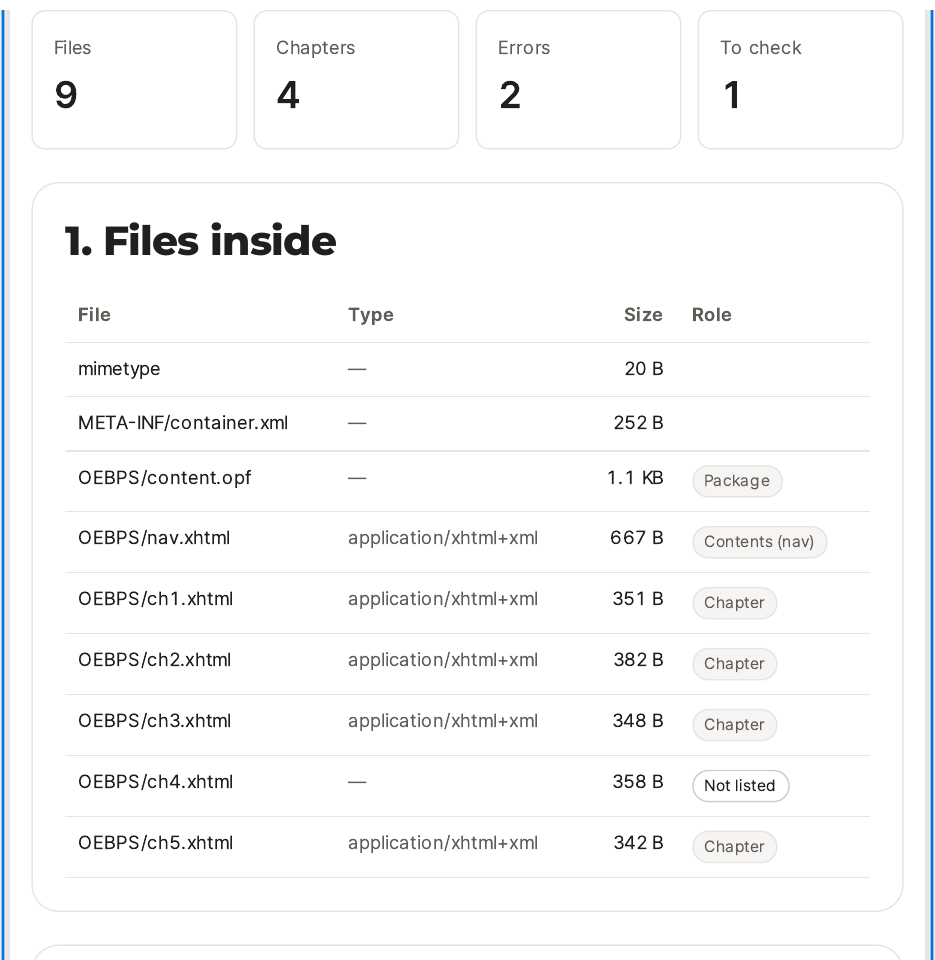
The moment the file opened, the header read Files 9, Chapters 4, Errors 2, To check 1. The file list showed nine files, with ch4.xhtml the only one marked Type "—" and Role "Not listed". The chapter list showed Chapter 1, 2, 3, and 5 — no Chapter 4, even though the file is really there.

The book details were untouched by all of this: Title "A Field Guide to Imaginary Harbors", Author "Marin Solace", Language "en", Publisher "Harborlight Press (fictional)", Description empty. I applied them unchanged and got "Applied the book information." There is no cover image — "There is no cover image." — and the "Download cover" button is disabled.
Then I downloaded. "Created broken-sample-fixed.epub." The file is 3,200 bytes. I opened the downloaded file as a zip and checked it directly: the mimetype entry is first, stored uncompressed, and reads "application/epub+zip" — so the "Fixed on download" claim is real. The manifest now lists ch4, the spine still refers to ch4, and the contents links are ch1, ch2, ch3, ch4, and ch5 — the broken link is gone because its entry was deleted, and the chapter that was missing from the manifest is now in it.
And the header after the download reads Files 9, Chapters 5, Errors 0, To check 0, and the check list says "No broken internal links or missing files." There is no "errors remaining" warning any more.
 What I did not test: a chapter the reading order points at whose file is not in the package at all. The fix note says the rebuild removes the spine reference in that case — so check the "Fixed automatically" lines for your own file.
- Rebuilding the contents now keeps real chapters and shows what it removed. The rebuild kept Chapter 4 and listed the removed appendix entry by name. (Before the fix it deleted Chapter 4 silently.) Read the rebuilt list anyway — it is the last chance to catch a missing chapter before you download.
- The mimetype diagnosis doesn't say what is actually wrong. The check list only says the entry's "position, compression or content breaks the rule" — it never says which of the three it is. In my file the problem was compression, and the download really did fix it (verified in the downloaded zip: first entry, stored, "application/epub+zip"), but the tool itself never tells you that.
- A download is not a pass. In my test the rebuild cleared every error, so no warning appeared — the header read Errors 0. The old version let you download a file that still had errors, and I did not re-test that path, so if your header still shows errors after a rebuild, do not treat the download as fixed.
- It won't open DRM-protected books, and it won't rewrite body text. DRM files are not opened at all, and this is not a text editor — chapter structure, contents, metadata, and cover are the whole range. A typo in the body stays a typo.
- Your file stays in your browser. Nothing is sent to a server, and closing the window clears what you entered. Keep a separate copy of the original before you edit — the tool says so itself, and my test left the original file untouched.
The one line to remember
Fix what the checker named — then read the contents list before you resubmit.
Try the toolFix EPUB Chapters & TOC: split chapters, rebuild contents, edit metadataFix just the parts of an EPUB you need right now, without learning a new ebook editor.loopyti.comFAQ
Does it remove DRM? No. DRM-protected files are not opened at all — the page says so, and there is no way around it in the tool.
Can I rewrite the body text? No. It edits chapter structure, the contents list, metadata, and the cover. Body text needs an ebook editor.