Your Ledger Is Off by $372.00 — Find Which Entries Add Up to the Difference

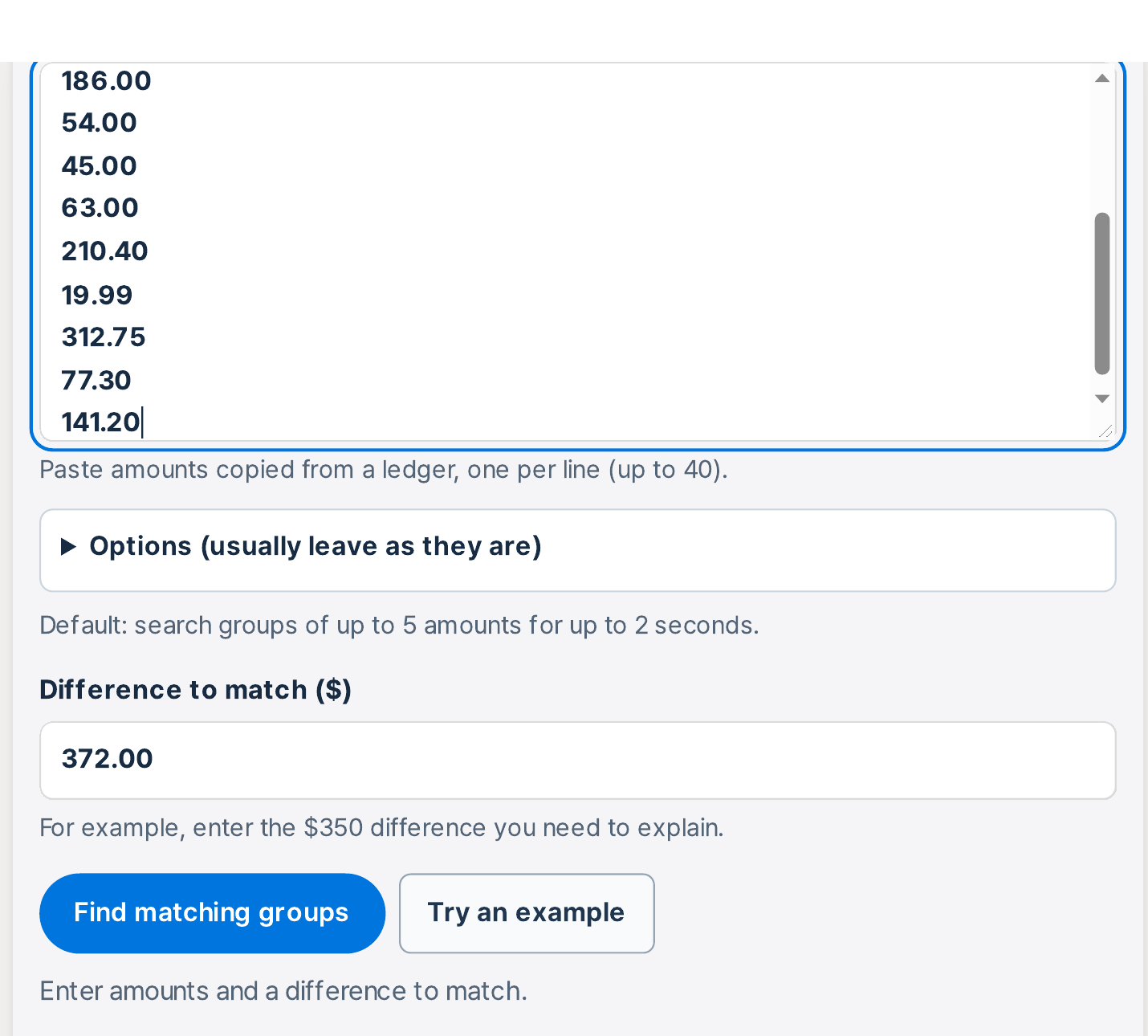
Don't recheck every entry one by one — the gap itself tells you which few entries to look at first. Paste the 15 amounts, enter 372.00 as the difference, and check the groups that add up to it exactly — then match each group against your receipts.
Try the toolFind Items Matching a DifferenceEnter a list of amounts and the difference to explain. The tool finds groups of amounts that add up to that difference.loopyti.comOne caution before you start: if you have already closed the books or filed for the period, finding a candidate group does not mean you can just edit the ledger. Confirm the cause against your receipts and bank statement first, then follow your normal correction process. A sum that matches is a lead, not proof.
How to find the entries in three steps
- Paste the amounts, one per line, and enter the difference. Put the 15 transaction amounts into the tool and type 372.00 as the difference to find. Plain numbers only — no dollar sign, no commas. When I added a line reading "$1,234.56" the tool stopped with a dialog headed "Check the input" and the message "Check the amount format on this line: 16". If your list lives in a spreadsheet, you can also drop the file in instead: the tool takes an XLSX, XLS, CSV, TSV, or TXT file up to 10 MB.
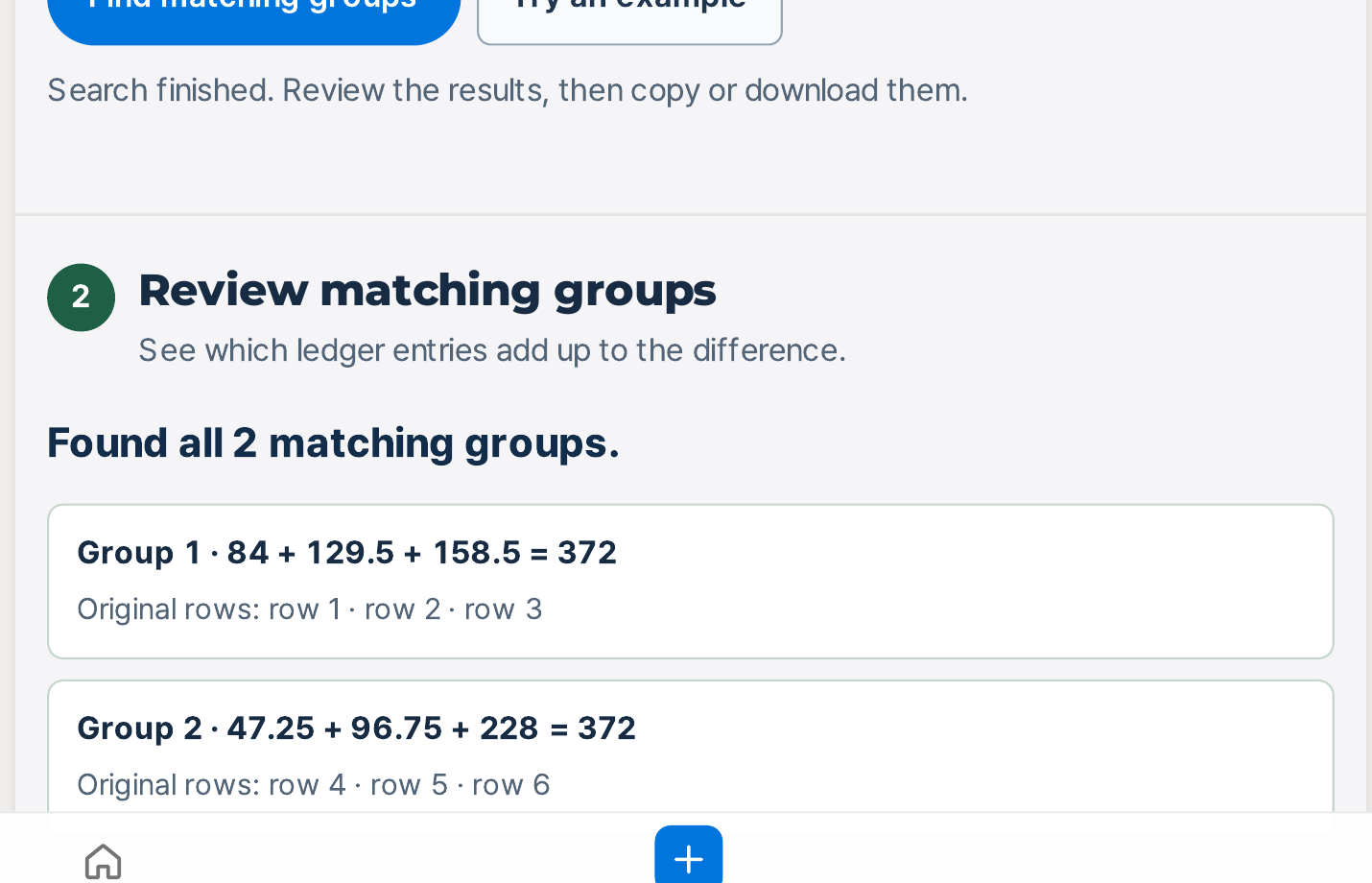
- Read the candidate groups. The tool answers "Search finished. Review the results, then copy or download them." and lists the groups whose amounts add up to exactly 372.00. In my test it found two. The page says the smallest groups come first, and only the first 20 smallest groups are shown — but both of my groups had three entries, so I couldn't verify the ordering from this sample alone.
- Check each candidate against your receipts — the tool can't do that part. A group only becomes the answer when its entries are missing from the bank statement. Compare every candidate group with the statement yourself, and keep the one whose entries are all absent.
Does it actually work? I tested it
I made up a week's ledger for a fictional shop, "Maple & Thread" — every name and amount in it is invented — with 15 transactions totalling $1,853.64 and a gap of $372.00 between the ledger total and the bank balance. Tested 2026-11-15.
The tool found both groups I had planted, word for word as it shows them:
- Group 1 · 84 + 129.5 + 158.5 = 372 — "Original rows: row 1 · row 2 · row 3"
- Group 2 · 47.25 + 96.75 + 228 = 372 — "Original rows: row 4 · row 5 · row 6"
"Found all 2 matching groups." One small thing to get used to: the tool drops trailing zeros, so 129.50 shows as 129.5 and 228.00 as 228. The sums are exact; only the display is trimmed.
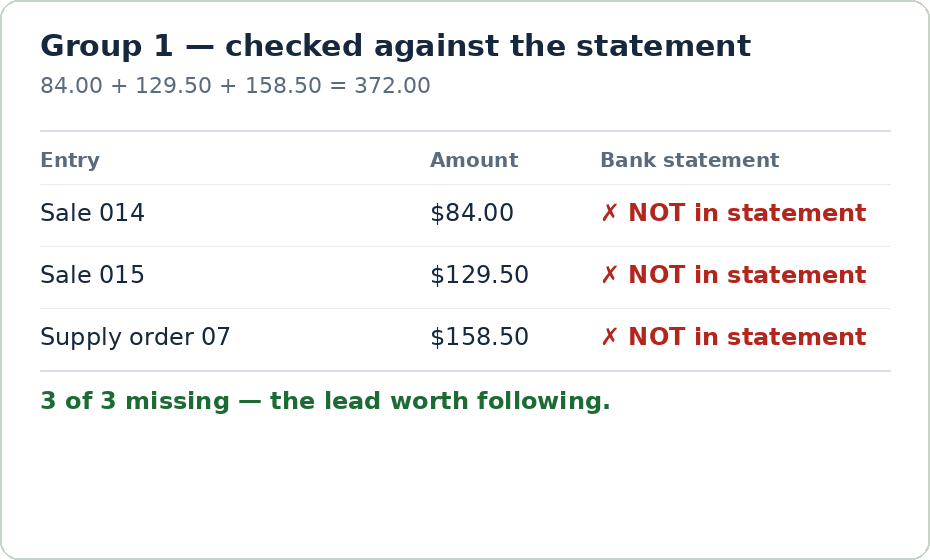
The first group was the real one. Sale 014 ($84.00), Sale 015 ($129.50), and Supply order 07 ($158.50) add up to exactly $372.00 — and none of the three appears in the bank statement for that week. Three entries recorded in the ledger that never reached the bank: that is a lead worth following.
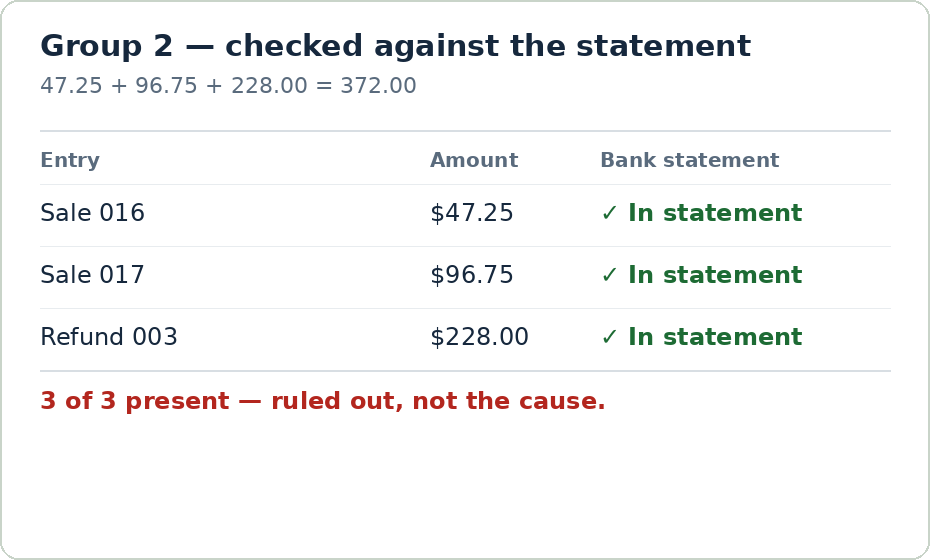
But the second group is the reason you check before you conclude. Sale 016 ($47.25), Sale 017 ($96.75), and Refund 003 ($228.00) also add up to exactly $372.00 — and all three are in the bank statement. If I had stopped at the first matching sum, I would have chased three entries that were never the problem. A matching sum is a lead, not proof, and the statement is what separates the two.
Before I even pasted the amounts, two quick checks narrowed the field. First, 372 is not divisible by 9 — 3 + 7 + 2 = 12 — so a single transposed digit can't explain this gap on its own; a transposed number always makes a difference that is a multiple of 9. The 54.00 / 45.00 pair in the list, and the 63.00 entry, are the kind of numbers that pair suggests, but both check out against the statement at the recorded amounts. Second, Sale 018 is $186.00 — exactly half the difference. If it had been recorded on the wrong side, the gap would be $372.00. It is in the statement for the correct amount, so that possibility is out too. Neither check is something the tool shows you on its screen; they are in the page text under "How to investigate a ledger difference", and they are the two things to look at before you search the groups.
So the honest score for my sample: the tool narrows fifteen entries down to two candidate groups, and the statement check is what turns one of them into the answer. The tool never says which group caused the gap — that decision stays with whoever reads the statement.
One more practical detail: the results don't vanish when you close the page unprepared. "Copy results" answers "Results copied.", and "Download text file" saves a 156-byte text file with the groups in it. Mine reads:
Found all 2 matching groups. Group 1 · 84 + 129.5 + 158.5 = 372 (row 1 · row 2 · row 3) Group 2 · 47.25 + 96.75 + 228 = 372 (row 4 · row 5 · row 6)
Why a gap is a sum in hiding
A difference is a sum in hiding. If three entries never reached the bank, the gap between the ledger and the balance equals exactly those three amounts added together — so searching for groups that add up to the difference is searching for the missing entries backwards. The catch is the same logic in reverse: any other three amounts that happen to add up to the same total will look just as convincing until you check them against the statement. That is why the tool gives you candidates and the statement gives you the answer.
What about the other ways?
Adding combinations up by hand with a calculator works when there are five entries. With fifteen, the number of possible groups runs into the thousands, and you will miss the right one long before you find it. The tool's job is to do that arithmetic, not to think for you.
Setting up Excel Solver can do it too. But you have to enable Solver, set up binary variables and a target cell, and know what a constraint is — a real barrier if you have never touched it. This tool asks for two things: the amounts and the difference.
Rechecking every transaction from scratch is the most certain method, and it is also the slowest. Fifteen entries against receipts and a statement takes an afternoon; fifty takes a week. The tool doesn't replace that check — it tells you which few entries deserve it.
This tool's place is the middle case: the difference is already known, the list of entries is already in your hands, and you want to know which few entries are worth checking against the records. If you don't have the list yet, or the difference itself is still a guess, fix that first.
What it won't do — read this first
- It won't tell you which group caused the gap. Several groups can match by chance — in my sample, two did. Verify every candidate against your source records before deciding anything.
- A mistyped amount may match nothing — and a formatted one is rejected outright. Amounts take up to two decimal places and must be under $10 trillion. A dollar sign or a comma stops the search with "Check the amount format on this line: 16". Paste plain numbers like 129.50, not $129.50 or 1,234.56.
- It takes a file, too. Drop an XLSX, XLS, CSV, TSV, or TXT file up to 10 MB into the upload box instead of pasting. Files up to 10 MB and tables up to 50,000 rows are read locally in your browser — the tool says nothing is sent to a server. That note covers files; the pasted amounts themselves carry no such note on screen, so paste amounts only, never account numbers or names.
- Large lists are limited. The tool searches up to 40 amounts, groups of up to 5 amounts, for up to 2 seconds by default. Only the first 20 smallest groups are shown, and if the search runs out of time the results may not follow ledger order. Split a long list by week or month and compare each period separately.
- It won't show the transposition or half-difference checks on screen. Those live in the page text, not in the tool. Read them before you search — they can rule out a whole class of causes in seconds.
- It trims trailing zeros in the display. 129.50 shows as 129.5 and 228.00 as 228. The sums are exact, but if you copy the results into your own records, the amounts won't look exactly like your ledger's.
The one line to remember
A matching sum is a lead, not proof — check the smallest group against your receipts first.
Try the toolFind Items Matching a DifferenceEnter a list of amounts and the difference to explain. The tool finds groups of amounts that add up to that difference.loopyti.comFAQ
What if several groups add up to the difference? Start with the smallest groups and the ones holding larger amounts, then check each one against your receipts or statement. In my test two groups matched, and only the statement check told them apart.
What if no group matches the difference? First check the amounts for a typing error — a transposed digit is the most common cause, and it usually leaves a difference divisible by 9. Remember the format too: no dollar signs or commas, or the search won't run at all. If the amounts are right, the gap may come from something outside this list: an entry missing from the list entirely, or a duplicated entry.